
Searching for an Mfortune Casino APK can be confusing: search results may lead to unofficial downloads, outdated files or sites pretending to represent the casino. UK players should take a careful approach. The safest option is to use Mfortune’s official website and follow its current instructions for mobile access. Do not install an APK simply because a page promises a bonus or claims to offer a faster app.
This guide explains how to check whether an Android app is genuinely available, how to reduce security risks, and how to access Mfortune on a phone if installation is not offered. It also covers bonus terms and the checks worth making before depositing. Availability and instructions can change, so confirm the details directly with Mfortune before acting.
Start with the official source
Type Mfortune’s web address into your browser yourself or use a trusted bookmark. Check that the address is spelled correctly and that the connection uses HTTPS. The official UK site is gb.mfortunebonus-uk.com. A secure connection alone does not prove that a site is genuine, so verify the domain and avoid links from unsolicited texts, social media messages, advertisements or download sites.
Look for a mobile app link or clear Android installation instructions on the official site. If no APK is offered there, do not assume that a file hosted elsewhere is authorised. Contact customer support using contact details shown on the verified site and ask whether an Android app is currently available. A reputable operator should be able to explain its supported options without directing you to an unverified file.
How to check an APK before installing
An APK is an Android application package. Installing one from outside Google Play may require you to allow installations from a particular source. That setting can expose your device to risk if you later forget to turn it off or approve a malicious download. The checks below reduce risk, but they cannot guarantee that a file is safe.
- Confirm availability. Check Mfortune’s official website or ask its verified support team whether it currently provides an Android APK for UK customers.
- Use only the official download route. Do not use third-party APK libraries, file-sharing links or “modded” versions. Never install software advertised as a way to bypass account checks or unlock bonuses.
- Check the publisher and permissions. During installation, review the app name and requested access. A casino app should not need unrelated access such as SMS control or broad access to your contacts. Stop if anything looks inconsistent.
- Keep Android protected. Install operating-system and security updates, use Google Play Protect or another reputable security tool, and avoid installing while your device is rooted or otherwise weakened.
- Disable unknown-source access afterwards. If you were instructed to allow installation from a browser, switch that permission off once the process is complete.
- Verify the account page. Open the app or mobile site from the official route, check the domain before signing in, and never enter your password after following an unexpected pop-up or redirect.
Do not share an APK file with friends or install it on a device you do not control. Keep your login private, use a unique password and enable any additional account security options that Mfortune provides. If you have already installed a file from an unverified source, remove it, run a security scan and change your casino password from a trusted device. Contact the operator if you entered payment details or suspect that your account has been accessed.
Using Mfortune on Android without an APK
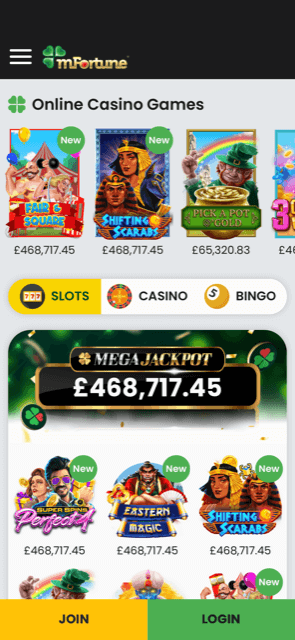
If an official app is not available, the mobile website may be the safer and simpler choice. Open the verified Mfortune site in your browser and sign in only after checking the address. A mobile site can provide access to account features and games without requiring an installation, although the selection and layout may differ from a dedicated app.
Some Android browsers let you add a website shortcut to the home screen. This creates an icon that opens the site; it does not turn the website into an independently verified casino app. Use this option only from the official page, and check that the shortcut continues to open the correct domain. If the site asks you to download an unexpected file, stop and contact support.
Bonus terms: check before you claim
A casino bonus can have separate eligibility rules for new and existing customers. Before opting in, read the offer’s full terms and conditions, including the minimum deposit, wagering requirement, eligible games, maximum bet, expiry date and any withdrawal limits. A headline amount does not tell you how much you need to wager or whether a particular game contributes fully.
Do not claim an offer solely because an unofficial APK page promises an exclusive reward. The promotion may be false, expired or attached to a fraudulent account page. Check the offer while signed in through the verified Mfortune website, and ask support to clarify any unclear conditions before depositing; A bonus is optional; declining it may be sensible if its restrictions do not suit how you intend to play.
Questions and answers
Does Mfortune definitely offer an Android APK?
App availability can change, and it may vary by device or operating-system version. Check the current official site or contact verified customer support. If Mfortune does not provide a direct, official download route, do not install a file claiming to be its app.
Is an APK from a search result safe if it has good reviews?
Not necessarily. Reviews can be misleading, and a file can be changed after it is uploaded. Treat third-party downloads as unverified, regardless of ratings or claims. Use the official source or the mobile website instead.
Can I use the mobile website instead?
Yes, if mobile access is available to your account and location. Navigate to the verified site in your browser, check the address carefully and use the official sign-in page. The mobile experience may differ from an app, but it avoids installing an unknown package.
What should I do if an APK requests unusual permissions?
Cancel installation. Do not grant access to messages, contacts, accessibility controls or other features that do not appear necessary. Confirm the app’s legitimacy with Mfortune using contact details from its verified website.
How do I know whether a bonus is worth taking?
Read the full terms and calculate the required wagering before opting in. Consider the eligible games, expiry, maximum stake and withdrawal conditions. If any rule is unclear, ask support before making a deposit.
Responsible play and account safety
Only use Mfortune if you are at least 18 and are legally eligible to gamble in the UK. Check that the operator’s current UK licensing information is displayed on its official site, and review the terms that apply to your account. Never use someone else’s payment method or attempt to bypass identity, age or location checks.
Set a spending limit before playing and treat casino games as entertainment, not a way to make money. Outcomes are uncertain, and bonuses do not remove the risk of losing a deposit. Take breaks, do not chase losses, and stop if gambling is affecting your finances or wellbeing. Use the operator’s safer-gambling tools where available; UK players can also seek confidential support from organisations such as GamCare.
The safest download decision is straightforward: install an Mfortune APK only if the operator itself currently provides it through a verified channel. Otherwise, use the official mobile website and avoid third-party files. Checking the domain, app permissions and bonus terms takes a little time, but helps protect your device, account and money.
